
Work In Progress: is a great place for processes. They are also quite large so you can get a good look at how they are done.
Slam Blogsma: this blog by Sam Bosma has loads of thumbnails and sketches and shows how he goes from these to digital colour and texturing in Photoshop.
The Unreachable Itch is a blog by illustrator Jonathan Burton. He also posts character sketches, sketches to line work and colour finals.
Wednesday
Process: seeing how other people work
 Stumble it!

Friday
The Art Center: get some advice from the experts
'The Art Center is a brand new place where Artists will share Ideas, Tips, and Tutorials. It will quickly grow both in content and artists from all the different art mediums. The Art Center will be a sister site to the Character Design blog'
This is a relatively new site but already has many fascinating posts full of advice about drawing and design written by pro artists. You can follow this blog on Twitter to be sure not to miss any great tidbits.
Wednesday
WE book illustration: Process
I had the basic idea for the composition in my head and then made some thumbnails in Photoshop to see what it could look like and chose the image on the left as it has better balance.
 then I drew a large detailed sketch on paper with a blue col erase pencil and scanned it. It also got flipped along the way. I put the line art on the top layer set to Multiply, this allows you to preserve your line art and paint on a white layer underneath.
 I often start off painting with the gradient tool set to Radial and use it to paint. This is a really fast way to get some colour down. For this piece I made selections of the cosmonaut, mountains, planet and sky and then made alphas or masks of each one on other layers for easier selecting and painting later on
 Then I lay down the basics with a large round brush set at 75% opacity, when I'm more or less sure of my values I take the brush opacity down to 50% . I used to paint a lot with watercolors and use the same sort of technique here. I gradually use a smaller and smaller brush to do details
 As a rule I'm not keen on using special brushes, here I just used a stippled brush shape for the stars and the airbrush for some texture on the planet. I also used various layers set to Screen and Overlay modes to get the halo around the planet.
 For the visor on the helmet I made an alpha layer to use as a texture with the 'Lighting effects' filter to make the relection look more spherical as it was too flat. Then I flattened all the layers and noodled around a bit to get a more unified look.

Tuesday
Coolvibe: digital art to inspire you
 Bobby Chiu
Imagine FX new issue out now
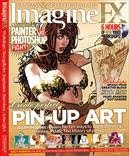
The latest Imagine FX mag has some good stuff this month.There's an article on how to make up a good portfolio, some interesting workshops including 'paint smarter, not harder' and another of their series of development sheets for game concept art.
An article titled' Photoshop vs Painter' takes on this endless argument, which I think is a futile one since they are both useful for different purposes. Anyway the contest ends in a draw here which makes sense. It is worth reading this article though if you are not familiar with one or either of the big P's, as they use 10 good examples to show how and when to choose Photoshop over Painter or vice versa.
Monday
3 Art podcasts not to miss
I am a podcast addict and recently came across some really good art pods via Twitter:
Escape from Illustration island podcast
Chris Oatley artcast
Art and story podcast
the guys who do these podcasts also have super sites so have a look at them while you listen to their pods.
Subscribe to:
Posts (Atom)


